Kadadesk by Kunlun Growth

A desktop AI assistant that answers customers from your own materials, and hands over when it is not sure.

Kadadesk sits on your computer, works in the chat windows you already use, and keeps your materials and customer records on your machine. You can review every reply before it goes out.

Free to download and try. For Mac (Apple silicon), Windows, and Android (phone connected to a computer, in trial). The download page is on our Chinese site, and the interface and documentation are currently in Chinese.

Capabilities

Built for one job: handling customer conversations.

Features marked “in trial” are still being refined.

01 · Automatic replies

Customers write; Kadadesk replies.

  • Reads the chat window you have open and replies from your materials.
  • Confirms the message was really sent, and tells you if it was not.
  • Does not force an answer when unsure; it alerts you.

02 · Knowledge base

Drop your materials in; it organises them.

  • Word, PDF, Excel, whole folders and archives.
  • Paste web page or GitHub repository links.
  • Answers you give yourself are learned for next time.

03 · Review and takeover

You stay in control.

  • Review mode: replies are drafted and you click before sending.
  • Per-contact rules: you handle family and friends, Kadadesk handles customers.
  • It steps aside the moment you touch the mouse or keyboard; one click pauses it.

04 · Customer files

One file per customer.

  • Records only what the customer said, each with its source.
  • A daily list of who to follow up, with messages drafted for your approval.
  • Files stay on this computer.

05 · Marketing and group sync (in trial)

Content drafted daily, posted once you approve.

  • Drafts copy from your materials and picks images from your library.
  • Approved posts go out at the time you set.
  • Text sent in a main group can be forwarded to groups you choose.

06 · More channels (in trial)

Phone, Feishu, DingTalk, LinkedIn.

  • An Android phone connected to the computer can take conversations.
  • Feishu (Lark) and DingTalk official interfaces.
  • LinkedIn web messages (in testing): replies in the sender's language and, by default, each reply waits for your confirmation.

Control and data

What it does with your information.

  • Materials and conversation records are stored on your own computer.
  • To generate a reply, the relevant message content and materials go to the model service you configure.
  • A free trial model is included for testing. For real use, connect your own model account and pay the provider directly. Licence and model fees are separate.
  • If someone asks for passwords or verification codes, it politely declines.

Limits

What it does not do.

  • It does not promise unattended operation.
  • It does not guarantee any chat platform will allow it.
  • It does not quote prices or commitments that are missing from your materials.

Getting started

Four steps to your first reply.

  1. Download and install. Mac (Apple silicon), Windows or Android.
  2. Open your chat app. Kadadesk works in the window you already use, without changing your chat software.
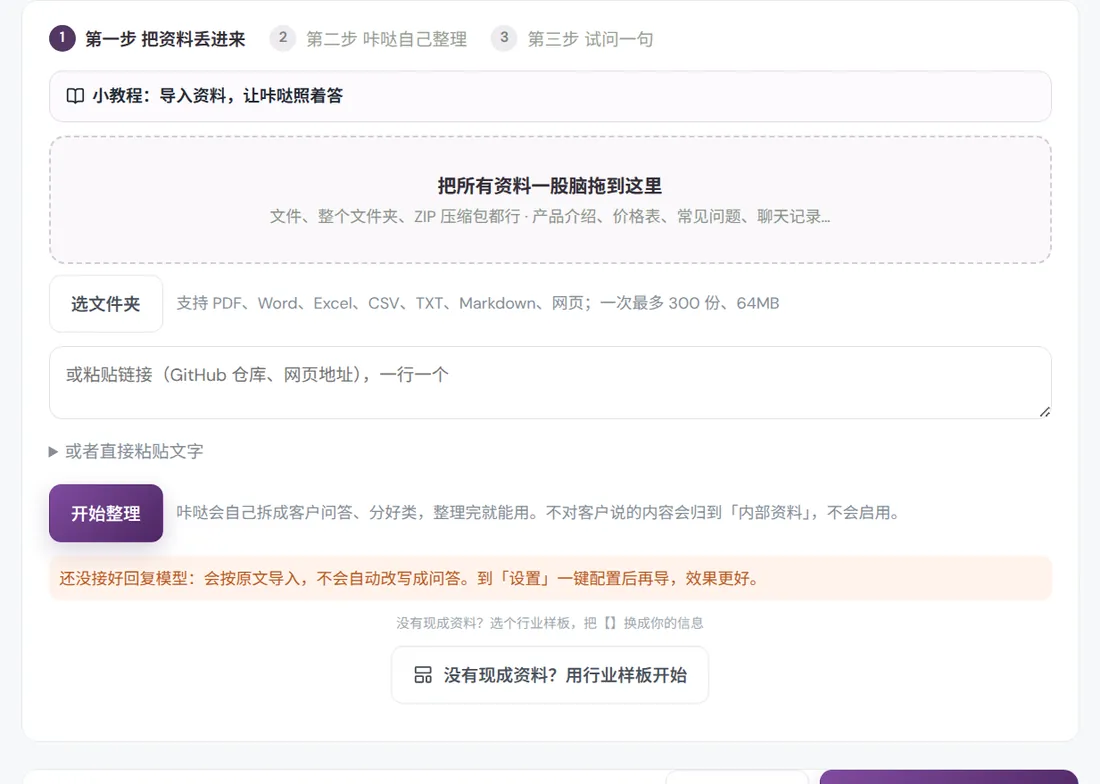
  3. Drop your materials in. Files, folders, archives or links; Kadadesk organises them into customer answers.
  4. Start receiving. Use review mode first if you want to approve every reply.
Screenshot of the Kadadesk materials import screen: drop files or folders, then Kadadesk organises them into customer answers. The interface is in Chinese.
The materials import screen in the current interface (Chinese).

Changelog

Latest version: 0.8.58 (13 Nov 2026).

Every release lists what changed. Recent releases below.

0.8.58The desktop companion also works on Windows; upgrades keep your settings; clearer message when the phone link fails.
0.8.57Renewals extend from the current expiry date; you can buy a longer term at once; unpaid orders say which order they are.
0.8.56Online purchase with automatic activation; monthly and yearly licences.
0.8.53Fixed the plugin connection; the small floating window can dock to the top edge.
0.8.52A Messages page gathers customer messages from all channels; several Android phones can be used at once.

Questions

Before you install.

Will Kadadesk reply to my customers automatically?

Yes, if you start it that way. When it sees a new message in the chat window you have open, it replies from your materials and checks that the message was actually sent. You can also use review mode, where it drafts each reply and you click before anything is sent.

Can it make things up?

Kadadesk answers from the materials you give it. Prices, discounts and commitments that are not in your materials are not quoted; it flags the message to you instead.

Where do my materials and chat records live?

Materials and conversation records are stored on your own computer. To generate a reply, the relevant message content and materials are sent to the model service you configure.

Could a chat platform restrict my account?

Kadadesk works by operating the chat window the way a person would, and it limits how often it replies and posts. Platform rules change and we cannot guarantee any platform will allow it. Try it on a spare account first.

Which chat channels are supported?

Kadadesk works in the desktop chat window you already use. Feishu (Lark) and DingTalk official interfaces and LinkedIn web messages (in testing) are also available or in progress. WhatsApp is not on our documented list of supported channels today, so please ask before planning around it.

Is there an English interface?

Not at the moment. Kadadesk's interface and documentation are in Chinese only. Our team can help you set it up and deliver it in English.

Want to know if it fits your team?

Download Kadadesk and try it, or write to us. We reply within 1 business day. Or email [email protected].